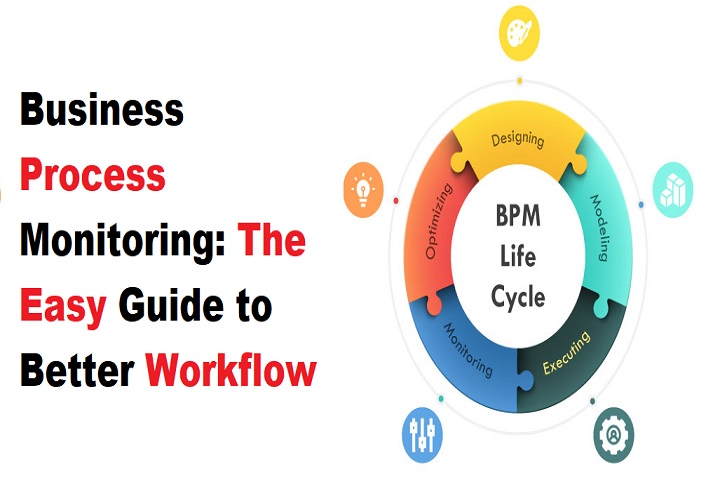
Efficient businesses are built on strong processes but even strong processes can slow down, break, or become outdated. This is where Business Process Monitoring (BPM) becomes important. It helps you understand what is happening inside your workflow, fix problems early, and keep your business running smoothly.
This guide is written in simple, beginner-friendly way and covers everything you need to know how BPM works, which tools you need, what mistakes to avoid, and how to build your own monitoring plan.
What Is Business Process Monitoring?
Business Process Monitoring (BPM) means tracking and observing how your daily business tasks are performed.
It helps you understand:
- What is working well
- What is slowing down
- Where errors are coming from
- How your team is performing
- How long tasks actually take
In easy words:
BPM is like putting a “health check system” inside your business workflow.
You don’t guess the problems you see them clearly.
You can also read our other article: Why More Retailers Are Entering the Fuel Business in 2025: Key Reasons & Benefits
Why Monitoring Your Business Processes Actually Matters?
Most businesses run many small tasks every day but owners don’t always know what happens inside those tasks.
Here’s why BPM matters:
It reduces mistakes:
Because you can identify where errors happen again and again.
It increases productivity:
When you remove slow steps, work becomes faster.
It improves customer satisfaction:
Fewer errors + faster service = happy customers.
It saves cost:
You stop wasting time, effort, and resources.
It gives you control:
You always know the real condition of your business.
In simple terms:
BPM tells you exactly what to fix for quick improvement.
Common Workflow Problems That BPM Can Easily Fix
Every business faces workflow challenges. BPM helps remove these problems:
1: Delays in task completion
When work gets stuck, BPM highlights the slow steps.
2: Miscommunication between teams
You can see where information is not being shared.
3: Unnecessary steps in workflow
Helps you remove extra tasks that waste time.
4: High error rate
Identifying where mistakes happen again and again.
5: No clarity on job responsibilities
Monitoring shows who is doing what exactly.
6: Poor use of resources
You can see which tasks consume the most energy, time, or money.
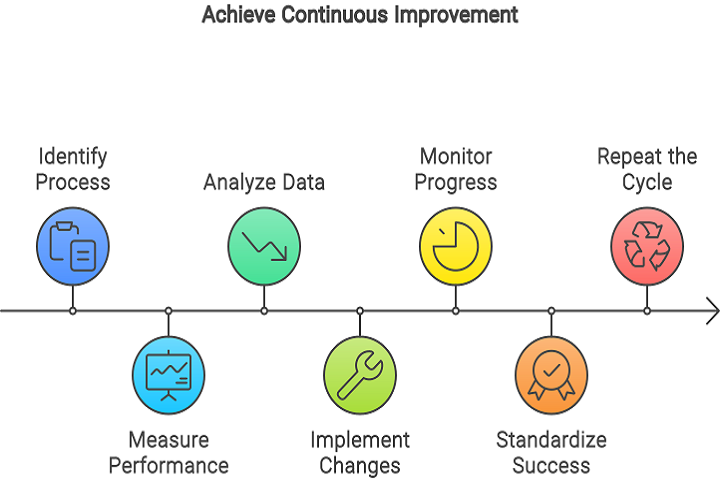
How Business Process Monitoring Works (Step-by-Step Flow)
Here’s an easy, beginner-friendly explanation of how BPM works:
Step 1: Choose the process you want to monitor
For example: order processing, payment approvals, customer service, etc.
Step 2: Identify all steps inside the process
Break the task into small actions.
Step 3: Track the performance data
Time taken, errors, delays, rework, etc.
Step 4: Analyze the data
Find out what is slow, weak, or incorrect.
Step 5: Take action based on the analysis
Improve or modify the steps.
Step 6: Monitor again
Make sure the improvement is working.
This cycle keeps your workflow clean and efficient.
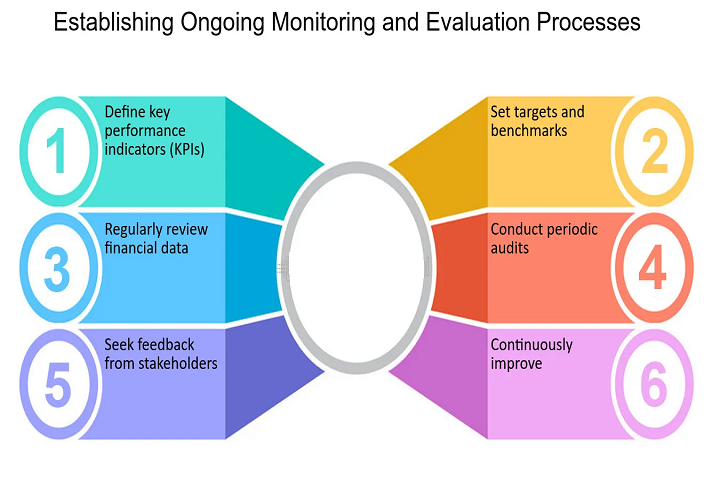
Key Components of an Effective Monitoring System
A strong BPM system includes:
✔ Data collection
Gather performance data from people and software.
✔ Real-time monitoring
See problems while they happen (not after).
✔ Alerts and notifications
Get automatic alerts when something goes wrong.
✔ Dashboards
Visual charts that show how your workflow performs.
✔ Reports
Weekly or monthly summaries of performance.
✔ Automation tools
Software that tracks tasks automatically.
With these components, your monitoring becomes more accurate and easy.
Essential Tools Used for Business Process Monitoring
Here are popular and beginner-friendly BPM tools:
1. Monday.com
Great for tracking workflow and team performance.
You can also visit it by: Business Process Management Tools
2. Asana
Helps manage tasks and identify delays.
3. Trello
Simple visual monitoring for small businesses.
4. Kissflow
Specially designed for process automation and monitoring.
You can also visit it by: Workflow Optimization Techniques
5. Zoho Creator
Offers dashboards, reporting, and automation.
6. Microsoft Power Automate
Strong automation + real-time monitoring for enterprises.
These tools help automate data collection and provide clear reporting.
7. How to Choose the Right Monitoring Tool for Your Business
Here’s how to pick the perfect tool:
Choose a tool that matches your team size
Small teams = Trello
Medium teams = Asana / Monday
Large teams = Kissflow / Power Automate
Select tools that are beginner-friendly
Avoid complicated systems if you’re new.
Look for real-time alerts
This saves you from disaster.
Go for budget-friendly options
Don’t overspend, choose tools that solve your actual problems.
Ensure it integrates with other apps
Email, CRM, accounting, etc.
Practical Examples of Business Process Monitoring in Real Life
Here are everyday examples to understand BPM better:
Example 1: E-commerce Order Processing
BPM checks:
- Order time
- Packing delay
- Shipping time
- Return issues
Example 2: Hospital Appointment Booking
BPM checks:
- Waiting time
- Doctor availability
- Cancelled appointments
Example 3: Bank Loan Approval
BPM checks:
- Verification time
- Document mistakes
- Approval delay
Example 4: Customer Support
BPM tracks:
- Complaint resolution
- Response time
- Quality of messages
These examples show how BPM works in every industry.
Benefits of BPM: How It Improves Productivity and Workflow
1. Faster Processes
Removing slow steps increases speed.
2. Fewer Errors
You fix issues early.
3. Better Team Coordination
Everyone knows their tasks clearly.
4. Increased Customer Satisfaction
Smooth workflow = happy customers.
5. Real-Time Decision Making
You know exactly what’s happening.
6. Saves Money
No wasted effort or repeated work.
How to Create a Workflow Monitoring Plan?
Step 1: Pick one workflow
Choose only one process to start.
Step 2: Map the full workflow
Write down each step from start to finish.
Step 3: Identify key metrics
Time taken, responsibility, tools used, errors.
Step 4: Set performance goals
For example:
- Reduce order delay by 30%
- Decrease customer waiting time to 5 minutes
Step 5: Give roles to each team member
Define responsibilities clearly.
Step 6: Start monitoring using a tool
Use dashboards, alerts, and reports.
Step 7: Improve weak areas
Fix the biggest bottlenecks first.
Step 8: Monitor again
Keep improving regularly.
Important Metrics You Should Track in Every Workflow
These metrics help understand your process:
1. Cycle time
How long a full process takes.
2. Error rate
Number of mistakes.
3. Bottlenecks
Steps that slow down the workflow.
4. Employee performance
Task completion time, accuracy.
5. Success rate
Completed tasks vs failed tasks.
6. Cost per process
How much money each process requires.
These metrics give clear visibility into workflow performance.
Automation in BPM: How It Saves Time and Reduces Errors
Automation makes monitoring easier and more accurate.
Automatic data collection
No need for manual reports.
Instant notifications
When something goes wrong, you are alerted instantly.
Better accuracy
Machines don’t make mistakes in calculations.
Consistent performance
Automated systems work 24/7.
Cost reduction
Less human effort = less expense.
Automation is the future of BPM and gives your business a huge advantage.
Tips to Keep Your Workflow Smooth and Efficient
- Review your processes monthly: Small checks prevent big problems.
- Keep communication clear: Use chat tools, shared dashboards, and task managers.
- Train your team: Everyone should understand the workflow.
- Use automation wherever possible: It saves time and increases accuracy.
- Remove unnecessary steps: Don’t complicate the workflow.
Common Mistakes to Avoid in Business Process Monitoring
- Monitoring too many processes at once: Start with one.
- Not updating workflows: Old workflows create delays.
- Ignoring employee feedback: Your team knows the real problems.
- Relying only on manual monitoring: Use a tool data becomes more accurate.
- No performance goals: Without goals, monitoring is useless.
Future of Business Process Monitoring: Trends You Should Know
The future of BPM is full of smart technologies:
AI-Based Monitoring
AI predicts problems before they happen.
Machine Learning Dashboards
ML analyzes patterns and suggests improvements.
Robotic Process Automation (RPA)
Bots handle repetitive tasks automatically.
Predictive Workflow Models
Understand future trends in workflow performance.
Businesses that adopt these technologies grow faster.
Final Thoughts: How BPM Leads to a Better Business Workflow
Business Process Monitoring isn’t just for big companies.
Even small teams can use it to:
- Reduce errors
- Increase speed
- Improve customer experience
- Save unnecessary costs
- Make smarter decisions
If you want smooth, error-free, and fast workflows, BPM should be a part of your business strategy.
Frequently Asked Questions (FAQ’s):
1. What is Business Process Monitoring in simple words?
A. Business Process Monitoring means checking how your business tasks are done daily. It helps you find slow steps, errors, and areas that need improvement.
2. Why is BPM important for small businesses?
A. Small businesses often have limited time and resources. BPM helps them reduce mistakes, save time, and improve customer service without hiring extra staff.
3. What is an example of process monitoring?
A. A common example is monitoring order processing in an online store — tracking how long it takes to confirm orders, pack items, and ship them.
4. What tools are used for Business Process Monitoring?
A. Popular tools include Asana, Monday.com, Trello, Kissflow, Zoho Creator, and Microsoft Power Automate.
5. How does BPM improve workflow efficiency?
A. It highlights delays and errors, helps streamline tasks, automates repetitive work, and provides real-time reports to improve decision-making.
6. Is Business Process Monitoring difficult to learn?
A. No. BPM is easy to understand if you start with simple tools and monitor one process at a time.
7. What are the main steps of BPM?
A. The key steps are:
- Selecting the process
- Mapping it
- Collecting data
- Analyzing performance
- Fixing weak points
- Monitoring again